
Internship @

Semantic Notebook Categorization
I shipped a new entry point for AI-powered notebook outlines that became the primary discovery path, driving 60%+ of outline generation across Goodnotes’ 25M-user base.
Duration
2025 Summer
12 Weeks
Position
Product Design Intern
Team
Goodnotes AI-Assisted Note-Taking & Editing
Skills
Figma, Interaction Design, User Testing, User Research

Background
I was selected from a global pool of applicants to work onsite at Goodnotes’ Hong Kong office for 12 weeks as part of the AI-Assisted Note-Taking & Editing team.
Project Team
Isaiah Hoagland
Product Design Intern
Jack Zhang
Software Engineer
Leo Lau
AI Team Design Manager
Brandon Chuang
Product Manager
My Role
During their beta phase before the 2025 public launch, I collaborated with Product Managers, Engineers, Designers, and the Legal team.
My role included:
-
I contributed to research and identified user problems and quick fixes.
-
I designed and shipped new AI-assisted features.
-
I gave ideas and supported long-term product strategy and future direction.
My goal was to help students and professionals learn and take notes faster and smarter in Goodnotes.
Shipped Products
Entry points
I shipped new entry points that improve the discoverability of notebook outline organization tools, now available in the Goodnotes app on iPad and tablet devices.

If No Outlines Exists
Generate your first notebook outline
I added a button in the Outlines tab so users with no existing outlines can easily create one for their notebook or document.

If Outlines Exists
Generate a new outline
I added a coach mark that appears when an outline already exists or a PDF includes one, guiding users to regenerate and create an updated outline.
Previous Published Design
My Updated Published Designs
B.
Users consistently struggled to understand our AI capabilities because all related actions were buried in the chatbox’s unclear Quick Actions.

A.
Users expected the generate action to appear directly where outlines are located, but it wasn’t.

From my earlier beta usability testing, I found two recurring issues:
Impact
Although exact metrics are under NDA, after launch, the new entry point quickly became the dominant gateway to AI outlines, responsible for over 60% of outline usage among Goodnotes’ 25M users.
MVP Prototype
The problem & why it’s important
Goodnotes’ linear table of contents made it hard to organize and navigate notebook notes across multiple subjects.
It’s important because for five years, users requested nested outlines and bookmarks to group notes by theme instead of page order.

Target Audience
I designed for students and professionals who need faster, clearer tools for learning and productivity, helping them navigate and organize their notes more efficiently.
The Impact
I initiated a highly requested feature that improved navigation speed, enabled topic-specific AI queries, and created a consistent structure across PDFs, handwriting, and typed notes, shaping future roadmap directions.
Solution
I proposed and designed a semantic categorization system introducing topic folders and subtopics within a notebook.
MVP Breakdown
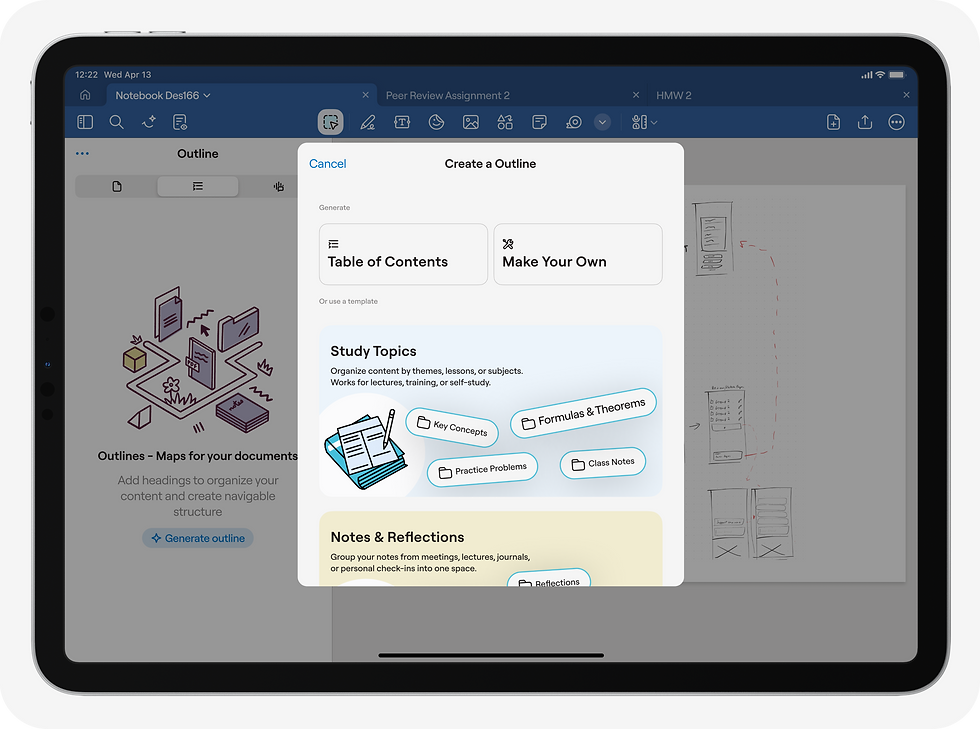
01
Create a Outline Template Selection
This outline creation modal gives users flexible options to structure their document, either through preset templates or a custom outline.
Both the modal and sidebar versions were necessary to explore so the team could evaluate the right long-term direction.

02
03
Start with a Template
Create Your Own Semantic Outline
Users can start with common templates and edit them to fit their needs.
This outline creation modal gives users flexible options to structure their document, either through preset templates or a custom outline.
Research
Preliminary Research
Conducted competitive analysis and synthesized prior Goodnotes research to identify future roadmap opportunities and inform market positioning.


Project Constraints and Company Timeline
I had three weeks to deliver a draft MVP prototype before my internship ended, ensuring engineers and designers could continue development for the planned Q4 launch.

Problem Space
Goodnotes Researchers shared that users struggle to organize large documents, manage multiple outlines, and regenerate updated structures.

I then did some research myself to gather insights from databases, and found a need for a quicker and easier organization and navigation system.
I’m reviewing a 3,000-page medical textbook and need different bookmark categories like test questions, personal notes, and templates. Goodnotes only gives me one type.

A student with a 150-page math notebook needs to group concepts like Differentiation, Integration, and Quadratics instead of scrolling through a single long file.
Why it Matters
Better structure makes Goodnotes faster, more organized, and more intelligent. It reduces friction for users handling complex documents and sets the stage for advanced AI-driven organization.
For the business: higher product value and stronger retention through scalable AI features
For users: faster navigation, cleaner organization, and increased trust in AI-generated outlines
Scope
Given the MVP timeline, product managers and I scoped the project down to the essential semantic outline flow: creating a topic, generating an outline, previewing it, and applying it.
Ideation
Multiple Outlines
I began mapping potential locations for multiple outlines and the flows for generating or regenerating them.
I proposed adding a folder section above the outlines so users can quickly see which outline they’re using, switch between linear and topic-based outlines, and create new ones.

Generating an Outline
I added a folder icon to distinguish standard outline pages from semantic topic categories.


Wireframing “Scoped Scenario 1:
No Existing Outline”
I sketched early directions for the three flows users can take to create an outline:
-
Table of contents (linear outline)
-
Make your own (semantic outline)
-
Use a preset outline and make it how you want it
Iconography
I added a folder icon to distinguish standard outline pages from semantic topic categories.

Challenges
A key challenge was limiting AI-generated recommendations to avoid unnecessary AI credit usage.
Challenges I faced:
-
Offering both basic AI-generated outlines and custom user-defined groupings required balancing automation and control.
-
Generating suggested topics or category names risked using significant AI credits, creating cost and feasibility concerns.

Before & After

Learnings & Reflection
This was my first industry internship, and the learning curve was steep. Here are the key areas where I grew, the unexpected lessons that shaped my approach, and the long-term impact this experience had on me.
Designing AI for both user needs and business realities
This project taught me how AI design is constrained not just by credit costs and query limits, but also by latency, data quality (like OCR and mixed handwriting/PDF content), and legacy system limits such as fixed outline structures. Working within those constraints pushed me to design flows that were intuitive for users yet realistic for engineering and the business to support.
Prioritizing the essential under tight timelines
With limited time, I had to prioritize only what was essential. Even though there were many promising directions, business and timeline constraints required clear scoping and disciplined decision-making.
Small changes can drive big impact
I learned that shipping something small, like a single well-placed entry point, can significantly improve discoverability and user behavior. It showed me that meaningful impact doesn’t always require large or complex features.