
Gesture-Based Navigation System
This project explores a first-of-its-kind gesture-based navigation system designed for skiers and snowboarders to access essential on-mountain tools without removing their gloves in freezing environments. Built around intuitive movement and clear information hierarchy, it rethinks how users interact with mobile apps in cold, high-motion environments.
Duration
February 2025
4 Weeks
Position
Interface Design I
— Bill Flora
Type
System Model Design
Video Prototype
Skills
After Effects
Figma
Premiere Pro
Summary
"I don’t like taking off my gloves or using my phone too much on the mountain." – Research Participant
When redesigning an app, we focus on what works, what doesn’t, and where there’s room for improvement. Most competitor apps share the same core functions. For skiing, that includes tracking friends, collecting stats, and discovering new locations. Some, like the Slopes app, take it further by diving deep into performance tracking.
The quote at the beginning stood out to me the most during my interviews. I had never considered accessing a phone without using my fingers, but it made me think about how I navigate my Apple Watch using gesture controls instead of touch. That realization sparked the question: How could I implement gesture-controlled navigation into a ski app to enhance glove-friendly accessibility on the mountain?
I had never worked with gesture control before, so it was a challenge, but also an exciting opportunity to explore. It’s not perfect, but I learned that innovation isn’t about perfection—it’s about pushing boundaries and making the most of the time I had for this project.One of the biggest challenges was staying within iOS gesture detection capabilities while ensuring controls remained intuitive, visually clear, and efficient. Another key discussion point was balancing information density while minimizing unnecessary wrist movements during selection. Right now, gesture control supports the most commonly used features, but I’d love to explore expanding it further while keeping it accessible.

“In my 30 years of working in the technology industry, I have never seen something like this...”
–
Instructor Bill Flora
Former Design Director at Microsoft (20 years)

Context
Originally a redesign of the IKON app, a snow sport season pass tool for discovering, tracking, and accessing resort tools, the project quickly evolved into something more ambitious.
Problem
"I don’t like taking off my gloves or using my phone too much on the mountain."
– Research Participant
It’s cold on the mountain.
Putting gloves back on can be difficult, especially if they are damp.
Removing gloves exposes hands to freezing temperatures.
Snow can easily get inside the gloves, making them wet and uncomfortable.
I invented a mobile gesture-based navigation system.
To explore, communicate, and track your ski day, all without ever lifting a finger.
The Active Hub
Everything you need, on the mountain, in one place.

On the mountain active hub
A gesture-based navigation system built on familiar motions that makes it intuitive to use to gap the learning curve.


Pan left to right to view the map or find your friends
Trigger emergency help fast
Intuitive, accessible, fast navigation system

Gesture Like Second Nature
A gesture-based navigation system built on familiar motions that makes it intuitive to use to gap the learning curve.

Shake to Unlock
Prevent accidental activation in your pockets by requiring an intentional shake to unlock.

View at Any Size
Whether you have perfect vision or not, all gesture navigation indicators are designed to remain clear and legible at any size.
Other Features
Explore faster, smarter, and easier


Summit Center
All your essential on-mountain tools in one place, including friend locations, unread messages, trail and lift updates, and Smart Search for quick access.

End your day with a recap
All your essential on-mountain tools in one place, including friend locations, unread messages, trail and lift updates, and Smart Search for quick access.
End-to-End Process

Competitive Analysis — SWOT Analysis and Task Flow Breakdowns
I began with a teardown of top ski apps like Ikon and Epic to identify commonly used features, most desired tools, and usability gaps.
Current ski apps often lack essential information, intuitive navigation, and strong visual design.


User Interviews
I conducted user interviews to identify desired features, when and why they use apps, and habits for usage.
I interviewed six skiers and snowboarders, including three Ikon users and three Epic users, to gather a wide range of insights and feature needs.
Findings:

Insights → Design Opportunities

Project Scoping/Pivot
Narrowed the project scope to three core features, shifting from a traditional redesign to a more innovative, feature-driven approach.
What started as a redesign of the Ikon Pass app became a new direction. After scoping and critique, I decided to focus on creating a gesture-based navigation system that allows users to control the app without removing their gloves. Some redesign ideas were still integrated, but the emphasis shifted to innovation over polish.


Context
The Shell Model: The Structure Behind the Mobile Gesture-Based Navigation System


Inspiration
Took inspiration from existing affordances

Minimizing User Effort for Gesture Controls
Reducing excessive wrist movements while ensuring gestures remain intuitive, responsive, and easy to use.
Managing Information Density Without Overload
Fitting essential stats and resort details on-screen without overwhelming users or making navigation feel cumbersome.
Optimizing Layout for Usability & Readability
Finding the right balance between a structured grid and an intuitive hierarchy to highlight key information while keeping the design visually engaging.
Overall Project Challenges
Ideation
I started brainstorming how to simplify the interface during use by focusing only on high-priority features & navigation structure.

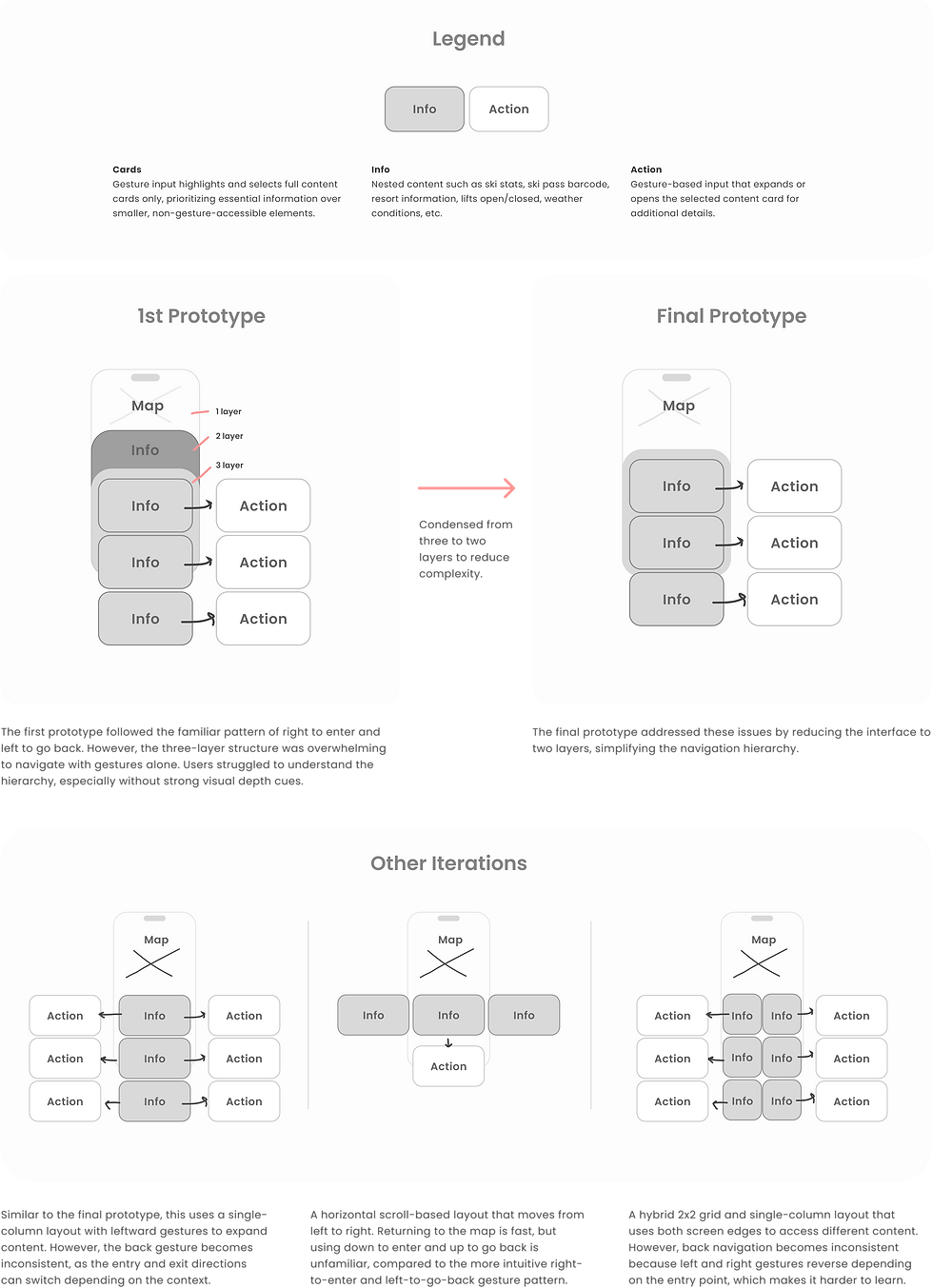
1st Prototype/Shell Model
The first prototype utilized a three layer information shell model to pritoize ski pass barcode, other features, and map.


Back to the Drawing Board
Explored multiple layout variations to optimize gesture-based navigation, visual clarity, and essential info hierarchy.

Finalizing the Navigation Model
After rounds of critique, we made a judgment call using familiar patterns while acknowledging the ambiguity of designing for an unexplored interaction model.
Active Hub Screen Iterations

Chosen Navigation Model
The chosen navigation model uses a layered approach and familiar affordances to separate high-priority actions from expandable content.

What's Next & Reflection
What’s Next: Testing and Validation
Gesture-based navigation was unfamiliar to both my instructor and me, so we had to embrace the uncertainty and make judgment calls.
With limited time and an ambitious concept, I wasn’t able to explore this idea as deeply as I wanted. Since neither of us had seen a solution like this before, it was new ground.
If I had more time, I would build on this by:
-
Reaching out to professionals in gesture interaction, wearable tech, or XR.
-
Conducting field studies to ask: Is it intuitive? Does it reduce friction? Can it scale beyond skiing?
Final Thoughts
Could this be something more?
This isn’t just a class project. It challenges how we interact with devices when touch is no longer reliable.
Key questions I’m still thinking about:
-
Can it scale beyond skiing?
-
Is it intuitive enough to replace tap gestures in cold environments?
-
Could it become a real product for winter sports or wearable UI?